Requesting Google Groups in a Domain through Apps Script

Monday, June 17, 2013 | 10:59 AM

Labels: ,

Editor’s Note: Guest author Niels Buekers is a Google Apps consultant at Capgemini Belgium. — Arun Nagarajan

During a recent Google Apps migration project, we received several requests to create custom groups of contacts so that users could more easily email frequent collaborators. Before switching to Google Apps, users created their own private distribution lists — but this approach led to overlapping groups that quickly fell out of sync.

The problem was a perfect case for Google Apps Script. We built a great solution that gives users as much power as possible with just a quick administrator review.


The situation before: either manually adding each contact or using a private contacts group.


Solution overview

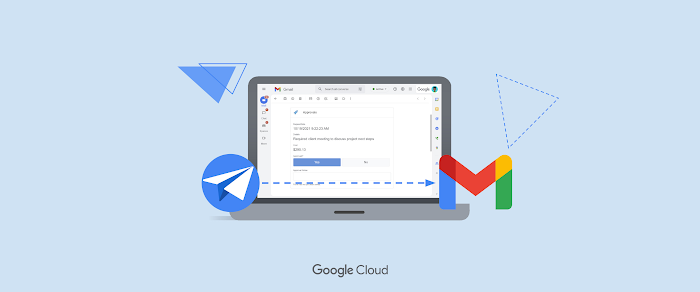
To start the process, a user adds a specific label to a Gmail message. A script that runs on a timed trigger then generates a request to create a group for all the addresses in the message. The script writes this data to a spreadsheet that tracks group names and administrator approval.

/**
 * Retrieves all 'group_request' threads and creates a request.
 */
function processInbox() {
  // Get threads that have the group_request label.
  var groupRequestLabel = GmailApp.getUserLabelByName('group_request');
  var threads = groupRequestLabel.getThreads(0, 10);
  
  // For each thread, retrieve all recipients and create a group request.
  for (var i = 0; i < threads.length; i++) {
    var firstMessage = threads[i].getMessages()[0];
    var sender = firstMessage.getFrom();
    var recipients = [];
    
    // Add sender.
    recipients.push(parseAddresses(sender));
    
    // Add recipients.
    if (threads[i].getMessages()[0].getTo()) {
      var toRecipients = parseAddresses(firstMessage.getTo());
      recipients.push(toRecipients);
    }
    
    // Add CCs.
    if (threads[i].getMessages()[0].getCc()){
      var ccRecipients = parseAddresses(firstMessage.getCc());
      recipients.push(ccRecipients);
    }

    // Write all recipients to a cell in the spreadsheet
    // and send emails to ask for group name and approval.
    createGroupRequestForRecipients(recipients,
        Session.getActiveUser().getEmail());
    
    // Remove label from this thread now that it has been processed.
    threads[i].removeLabel(groupRequestLabel);
  }
};

Handling the request

Once the request has been processed and written to the spreadsheet, the script sends the user an email that asks her to suggest a name for the group in an Apps Script web app. A second email asks the administrator to visit the web app to approve or decline the request. The results are again stored in the spreadsheet.

The spreadsheet contains a second script, which is triggered for each modification. Once the script confirms that the request has been approved, it uses the Apps Script Domain Service to create the new group.

/**
 * Creates a new group in the Google Apps cPanel with the provided name
 * and members.
 */
function createGroupWithAddresses(addresses,groupName){
  var group = GroupsManager.createGroup(groupName, groupName, groupName,
    GroupsManager.PermissionLevel.DOMAIN);
  var splitAddresses = addresses.split(',');
  for (var i = 0; i < splitAddresses.length; i++) {
    Logger.log('Adding ' + splitAddresses[i]);
    group.addMember(splitAddresses[i]);
  }
};

The result after successfully running the script.

This solution provides a simple way for users to request new Google groups, without all the overhead of manually creating an admin-managed distribution list.


Niels Buekers   profile | Twitter

Niels is a Google Apps consultant at Capgemini Belgium, with interest in both the technical track and change management. He recently visited Google’s London office to participate in a Google Apps Script hackathon, which resulted in the above solution. Niels is a strong believer in cloud solutions and loves to spread the word about Google Apps.

From a need to a startup, thanks to a Google hackathon

Monday, June 10, 2013 | 9:00 AM

Labels:

Editor’s Note: Guest author Arnaud Breton is a co-founder of UniShared — Nicolas Garnier

A few weeks ago, Clément and I started to take online courses (based on videos), mainly on Coursera, edX (the MIT-Harvard venture), and Udacity, the biggest online course providers.

Right from the start, we found that it was really painful to take digital notes while watching the video lectures: we had to switch between multiple windows, struggling to interact with them (no shortcuts to play/pause, etc) and no ways of matching the notes to videos... Finally we ended up taking notes with the old fashioned and archaic pens & papers.

After giving it a thought, we were convinced that we could make this much better. We both live in Mountain View, fifteen minutes away from the Google HQ, where a Google Drive hackathon was taking place so we decided to take this opportunity to find and build a solution to our problem. And we came up with the idea of a simple Google Drive app, which would embed both the video lectures and the notes, in the same window, letting us leverage all the shortcuts. Additionally, it would enable us to synchronize the notes with the videos, to be able to smoothly go to the related part of the videos while studying our notes. During the two days - and two nights - we developed that missing app, helped by the amazing Googlers from the Drive team and meeting other amazing people who came to also give birth to their ideas or to help us.

As a tech guy, it was a new exciting challenge to build this app, especially in such a short time. Fortunately, leveraging Google robust and powerful infrastructure and frameworks made it possible. It seemed obvious for us to leverage the Google Drive and Youtube APIs, to host our app on Google App Engine and to build it with the amazing AngularJS.

At the end of the hackathon, we managed to get a viable app, enabling students to create, save and synchronize their notes and videos. We were even rewarded by the Drive team who gave us a prize for our efforts!

VideoNot.es was born!


A few hours later, we started to spread the word about our new app and were convinced that it could be as useful for other students as it was for us. Immediately, hundreds of students started to use it, giving us useful feedback on what mattered the most to them. Based on their feedback, we continued to improve our app, with the number of users increasing. Today, one month after the hackathon, more than 300 VideoNotes are created daily all around the world, and the number continues to grow day after day!

We also got featured on The Next Web describing VideoNot.es as “a really useful tool to make, store and share notes about online videos as you watch them”

So, what’s next for us?
Obviously, continuing to improve the app based on feedback is our top priority.

Also, we have discovered new use-cases where VideoNot.es can be useful. For example journalists contacted us to tell us that they use it to write articles based on interview records. But also people in charge of the transcription of videos are also very excited about VideoNot.es.


It got us more convinced than ever that note-taking can be drastically improved, especially by adapting it to its learning context. We want to go even further. Bringing back social interactions in online classrooms, letting students easily share their notes, again leveraging Google Drive was the first step. Adding real-time collaboration and Q&A features is the second step and we will definitely take advantage of the Google Drive Realtime API for this.

Thanks a lot to the Drive team who organized this hackathon to give our idea a try through their amazing tools! And this is just the beginning of the adventure, that started from a problem we faced, whose solution has been found at the Google hackathon, and which is just starting to reach its potential.

Arnaud Breton profile

Arnaud Breton is passionate about the impact that technologies have on the world.  He is the co-founder and CTO of UniShared / VideoNot.es.

For shipping jewelry, Apps Script is golden

Friday, June 7, 2013 | 12:17 PM

Labels: ,

Editor’s Note: Guest author Jason Gordon is a co-founder of Beth Macri Designs — Arun Nagarajan

Beth Macri Designs creates jewelry from the point of view of a structural engineer. The forms are designed using generative 3D software systems and materialized using 3D printing technologies. Our company understands that to make beautiful fine jewelry, 3D printing is only the first step; traditional jewelry craft is then employed for final production. After our first product, The Hidden Message Necklace, was recently featured on The View as part of its Valentine's Day Gift Guide, we had a lot of orders to ship out. As soon as the mail leaves the building, though, the process is literally out of our hands: something unexpected was bound to happen to at least one or two packages. Several package-tracking services exist, but getting the names and tracking numbers into them was a cut-and-paste operation.

I knew that all of the tracking numbers were being delivered by email and I had already set up a Gmail filter to archive them and apply a label. With a little help from Google Apps Script, I knew I could automatically parse those emails and add them to my account on PackageTrackr (which syncs to their newer service, Fara).

The script supports reading emails from multiple shipping providers and is set up so one could easily add more. Every 30 minutes on a time-driven trigger, using the Gmail service, the script runs and looks through unread emails from the shipping provider label, then parses the name and tracking number out of each one. The provider, tracking number, and recipient are stored in a JavaScript array.

function getUSPSConversations(){
  return GmailApp.search("in:usps is:unread subject:(Click-N-Ship)");
}

function matchUSPSHTML(data){
  var out = [];
  var track_num = data.match( 
      /TrackConfirmAction\Winput\.action\WtLabels\=(\d+)/g);
  var to = data.match(/Shipped.to.*[\r\n]*.*>([a-zA-Z\s-_]*)<br>/g);
  for(i in track_num){
    var o = new Object();
    var track = track_num[i].match(/(\d+)/g);
    var person = to[i].match(/>([a-zA-Z\s-_]+)<br>/);
    var myPerson = person[1].replace(/(\r\n|\n|\r)/gm,"")
    o["number"]=track[0];
    o["carrier"]="USPS";
    o["person"]=myPerson;
    out.push(o);
  }
  return out;
}

You can parse all of your different shipping providers in one run of the script. After the all of the shipment emails are read, it composes an email to PackageTrackr to give it all of the tracking numbers it just harvested.

var user = Session.getActiveUser().getEmail();
if(data.length > 0){    
  for(d in data){
    body += this["formatForPackageTrackr"](data[d]["number"], 
        data[d]["carrier"], data[d]["person"]);
  }
  
  GmailApp.sendEmail("track@packagetrackr.com", "Add Packages",
      body, {bcc: user});
}

function formatForPackageTrackr(tracking_num, service, person){
  return "#:" + tracking_num + " " + service + " " + person + "\n";
}

Down the line, other shipping providers could be added such as UPS and Fedex. Additionally, more tracking services could be added instead of just PackageTrackr.


Jason Gordon   profile

Jason Gordon is a co-founder at jewelry startup Beth Macri Designs. He is responsible for software development, logistics and e-commerce. While working at Beth Macri Designs, Jason gets to find creative ways to put his software development skills to work to improve logistics and user experience.

What does storage quota unification mean for the Drive API?

Tuesday, May 28, 2013 | 9:00 AM

Labels:


Earlier this month, we announced that storage quota is now shared between Google Drive, GMail, and Google+ photos. As part of this change, the Google Drive API and the Google Documents List API will be updated over the next few weeks to start returning the updated storage quota information.

In the Google Drive API, this appears in the about collection.

GET https://www.googleapis.com/drive/v2/about


{
 "kind": "drive#about",
 "quotaBytesTotal": 16106127360,
 "quotaBytesUsed": 17936436,
 …
}


In the Documents List API, this appears in the metadata feed.

GET https://docs.google.com/feeds/metadata/default


<entry>
 <gd:quotaBytesTotal>16106127360</gd:quotaBytesTotal>
 <gd:quotaBytesUsed>17936436</gd:quotaBytesUsed>
 …
</entry>

The new values in the quotaBytesTotal field reflect total storage quota across all the unified products. If you rely on this value, you may notice a change in your apps, but we expect it to behave as if a user has just purchased more storage.

The new values for quotaBytesUsed field will reflect the total amount of storage used across the unified products.  (This field used to reflect the total amount of storage used by Google Drive.)


Ali Afshar profile | twitter

Tech Lead, Google Drive Developer Relations. As an eternal open source advocate, he contributes to a number of open source applications, and is the author of the PIDA Python IDE. Once an intensive care physician, he has a special interest in all aspects of technology for healthcare

Admin SDK and Google+ APIs for business

Thursday, May 16, 2013 | 2:34 PM

Labels: , ,

Every day, millions of businesses, schools and government agencies rely on Google Apps to get their work done. And each of these organizations has an administrator (or a team of admins) responsible for tasks like creating new accounts, managing mobile devices, and specifying exactly which products and features their employees can use.

Today, we're announcing the Admin SDK, which enables developers to build customized administrative tools for organizations that use Google Apps. The new Admin SDK consolidates many of the existing domain APIs into a new uniform structure and introduces new functionality with the Directory API and Reports API. We’re starting to pilot Google+ Domains API.

Directory API

The new Directory API provides a simple, RESTful interface to support all basic operations required to query & manage users, groups, organizational units, Chromebooks and mobile devices.

Reports API

The new Reports API gives developers a consolidated view of reporting and auditing for domains. Developers can build applications that can monitor and search across usage statistics and activities within a domain.

Google+ Domains API

Businesses are using Google+ to help employees collaborate more easily and get things done. Developers will soon be able to auto-provision Circles, read/write posts, and more from the new APIs. Let us know if you're interested in learning more about this API when it's available.

To begin using the Admin SDK follow the instructions in the API documentation. You will need to sign in to the Google APIs Console and activate the Admin SDK. If you have any questions, join the conversation at Stack Overflow.

Note about API deprecation:
With the introduction of the Directory and Reporting APIs in the new Admin SDK the following APIs will be deprecated per their standard deprecation policy: Google Apps Profiles, Provisioning, Admin Audit, Reporting, Reporting Visualization.

Ajay Guwalani  

Ajay Guwalani is Product Manager on Google Apps Admin APIs. His current focus is to build next generation admin APIs to make enterprise developers and admins happy.


Introducing Actions in the Inbox, powered by schemas

Wednesday, May 15, 2013 | 2:32 PM

Labels:

Search engines have been using structured data for years to understand the information on web pages and provide richer search results. Today, we are introducing schemas in emails to make messages more interactive and allow developers to deliver a slice of their apps to users’ inboxes.

Schemas in emails can be used to represent various types of entities and actions. Email clients that understand schemas, such as Gmail, can render entities and actions defined in the messages with a consistent user interface. In the case of Gmail, this means that the emails can display quick action buttons that let users take actions directly from their inboxes, as in the following screenshot:

Using schemas to add quick action buttons to the emails you send is easy. All it takes is adding some markup to your HTML emails, together with your regular content, in one of the supported formats - Microdata and JSON-LD.

As an example, the following JSON-LD markup can be used to define a movie and the corresponding one-click action to add the movie to your queue:

<script type="application/ld+json">
{
  "@context": "schema.org",
  "@type": "Movie",
  "name": "The Internship",
  ... information about the movie ...
  "action": {
    "@type": "ConfirmAction",
    "name": "Add to queue",
    "actionHandler": {
      "@type": "HttpActionHandler",
      "url": "https://my-movies.com/add?movieId=123",
      "method": "POST",
    }
  }
}
</script>

Gmail renders the markup above with a button labelled “Add to queue” next to the email subject line. When the user clicks on the button, Gmail sends a POST request to the url specified in the action handler. Your app has to handle these requests and respond to the email client with an appropriate HTTP response code (200 for successful requests, 400 for invalid requests, etc.).

Schemas in emails currently support four different types of actions - rate/review, RSVP, one-click action and goto link - and we plan to add more types moving forward. We are collaborating with a number of partners who will launch their integrations in the coming weeks, making the messages they send more useful and interactive for Gmail users. For example, Esna is using this to inform users of missed calls and provide them with a one-click button to be called again, while Seamless is implementing the rate/review action to collect feedback about restaurants.

Other partners who are already implementing schemas in email today include both Billguard, Concur Technologies, Docusign, HelloSign, Insight.ly, Mailchimp, myERP, Netflix, OpenTable, Orangescape, Paperless Post, Spotify, SugarCRM, and Tripit.

To learn more about all supported entities and actions and to find out how to get started with schemas in email, visit http://developers.google.com/gmail.

Claudio Cherubino   profile | twitter | blog

Claudio is an engineer in the Google Drive Developer Relations team. Prior to Google, he worked as software developer, technology evangelist, community manager, consultant, technical translator and has contributed to many open-source projects. His current interests include Google APIs, new technologies and coffee.

New Apps Script features at Google I/O—again!

Tuesday, May 14, 2013 | 5:33 PM

Labels: ,

This Wednesday is the start of our annual developer conference, Google I/O, and we can’t wait to share a bunch of new features that will help developers do more with Apps Script. So let’s not wait! Check out these new features launching today:

Scripts in Google Docs

Many of you have told us that you want to be able to extend Google Docs just like Google Sheets, with custom menus, dialogs, and triggers. Starting today, you can do just that (plus custom sidebars, too). To learn more about Apps Script in Docs—including a couple of secret features that we can’t tell you about yet!—please tune into the live stream with me and Jonathan Rascher on Thursday at 3:30pm PT.


Forms Service / Scripts in Google Forms

In response to another top request, you can now use the Forms Service to programmatically create and modify Google Forms, including triggers and a better way to respond to form submissions. (We’ve created a new 5-minute quickstart to get you going.) You can also extend the Google Forms editor with the same custom menus, dialogs, and sidebars as Google Docs. If you’re at I/O, learn how to build Forms with Apps Script by joining Eric Koleda and Matthew Ziegelbaum on Wednesday at 1:55pm PT.

Drive Service

For those of you who use the DocsList Service to automate your Google Drive, a newer version is now available. Drive Service comes with new features like setting the owner of a file or folder or changing the sharing settings. We designed the new service from the ground up to make it easier to work with large numbers of files and also fixed a lot of bugs. If you’re at I/O, Arun Nagarajan and John McGowan will give you more insight into Drive integration on Thursday at 1:40pm PT.

Faster HtmlService

At Google I/O 2012, we launched HtmlService to let you build custom user interfaces with secure client-side scripting. Starting today, you can enable an experimental version of the client-side sandbox that runs significantly faster in any browser that supports ECMAScript 5 strict mode.

Improved Authorization Flow and API Console Integration

You’ve also told us that authorizing a script takes too many steps. Now, you can opt in to an experimental new authorization flow that requires fewer clicks. In addition, every script that uses the new flow automatically creates a project in the Google APIs Console. This makes it much easier to use Google APIs that aren’t built in to Apps Script. To upgrade a script to the new flow, select File > Upgrade authorization experience. If you’re at I/O, Arun Nagarajan and Christoph Schwab-Ganser will demonstrate the new flow in their session on using the YouTube Analytics API with Apps Script on Wednesday at 1:55pm PT.

As you can see, we’ve been working hard to improve Apps Script for you. We hope you enjoy the new features!

Saurabh Gupta   profile | twitter | blog

As the product manager for Google Apps Script, Saurabh is responsible for Apps Script’s overall vision and direction.